Mail settings
The Mail settings tab is the place where we can change the settings for sending email messages.
Note
- Additional options are available for the
PROversion, such as: using your own SMTP server from which emails will be sent to customers,
uploading a logo that will appear at the top of the email.
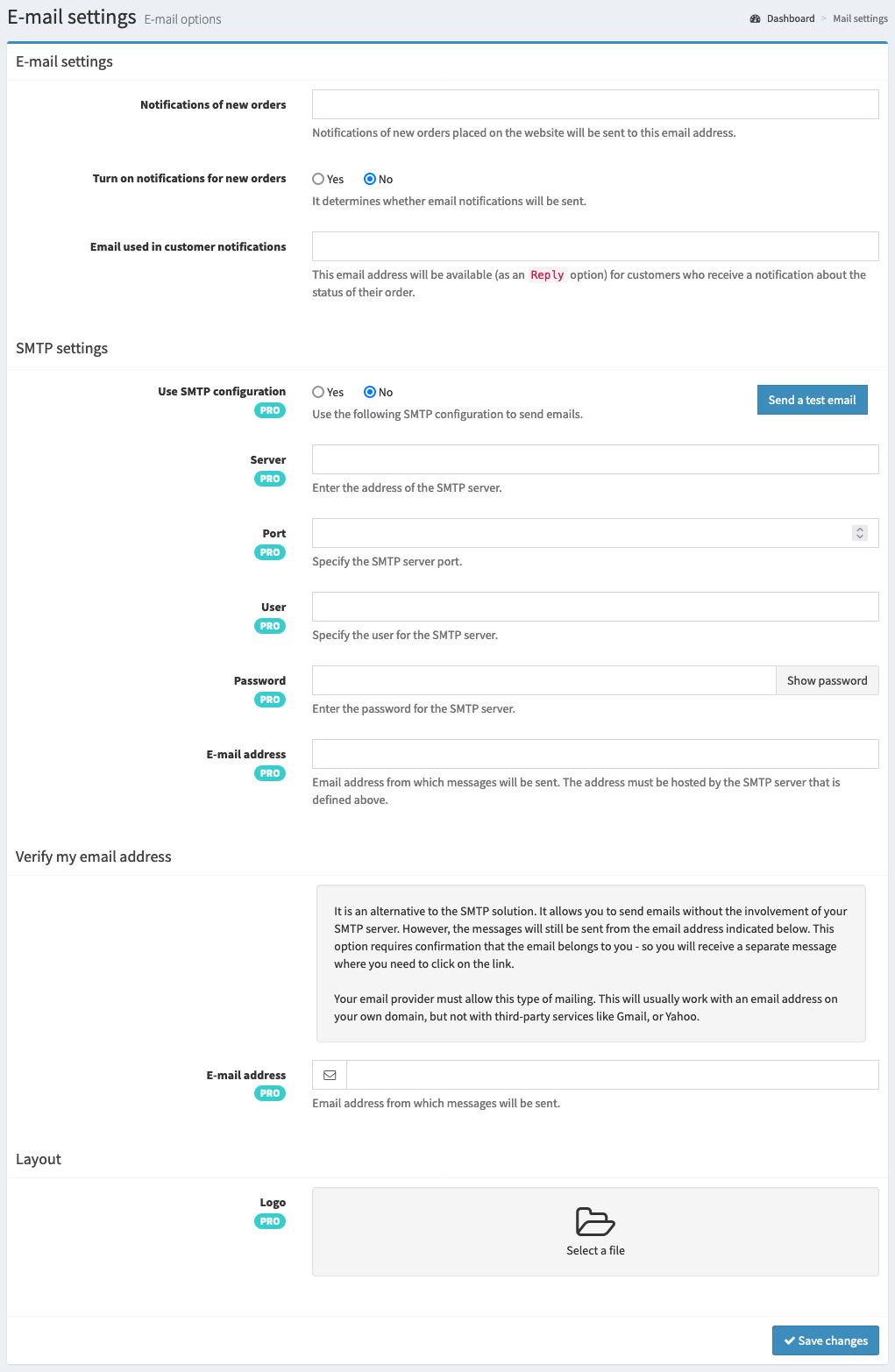
Available options
Here is a list of the available options with a short explanation.
- Notifications of new orders
Determines the email address to which notifications of new orders placed on the website will be sent. By default, this is the email address that was used to create the Foto.Guru account.
- Turn on notifications for new orders
Determines whether notifications of new orders will be sent.
- Email used in customer notifications
Determines the email address that will be available (as the
Replyoption) to customers who receive a notification about the status of their order.
SMTP settings
Your own SMTP configuration allows notifications to be sent to customers from your email address instead of the default
Foto.Guru address. All options in this section are available for the PRO version.
- Use SMTP configuration
Determines whether we use our own SMTP server settings or the default mail server.
- Send a test email
Allows you to check whether the SMTP settings provided are correct. The test email is sent to the email address that was used to create the Foto.Guru account.
- Server
Determines the
hostof the SMTP server that will be used to send emails.Tip
If you use the Google SMTP server, check whether your account has two-factor authentication enabled. If so, we will not be able to send emails from your account.
In this case, it is necessary to create a special password for our application on your Google account. Another alternative is to use a different email account.
- Port
Determines the
portof the SMTP server that will be used to send emails.- User
Determines the
user nameof the SMTP server that will be used to send emails.- Password
Determines the
user passwordof the SMTP server that will be used to send emails.- E-mail address
Determines the email address from which messages will be sent. The address must be hosted by the SMTP server defined above.
Layout
- Logo
Determines the file that will be visible as the logo in emails sent to customers.
Tip
The ideal dimensions for the logo are: 80px high (proportional width).
Any other logo dimensions will be scaled to this size. Pay attention to the “empty space” that often occurs in logo graphics (most often at the top and bottom). If we remove it, the logo will be larger and therefore clearer.