Comgate
Here is an explanation of the payment settings for the Comgate operator.
Comgate is a Czech payment operator - it is available for studios from the Czech Republic and Slovakia.
Available options
Here is a list of the available options with a short explanation.
- Shop connection identifier
Determines the identifier of the shop connection in Comgate (the
Shop connection identifierfield), usually a six-digit number.- Comgate password
Determines the password of the shop connection in Comgate (the
Passwordfield).- Payment result transfer address
Determines the address to which Comgate sends the result of the payment. Thanks to it, the order status changes automatically to “Paid” when the customer pays for it correctly. The address is shown in the Foto.Guru panel after selecting the
Comgateoperator.
You will find or set all of these values in the Comgate portal. Below we show step by step where to look for them.
Tip
Test mode uses the same credentials as live mode. If you enable Test mode in Foto.Guru, payments are only
simulated. Until Comgate activates your live account, payments work in test mode only.
Settings in the Comgate portal
Shop connection
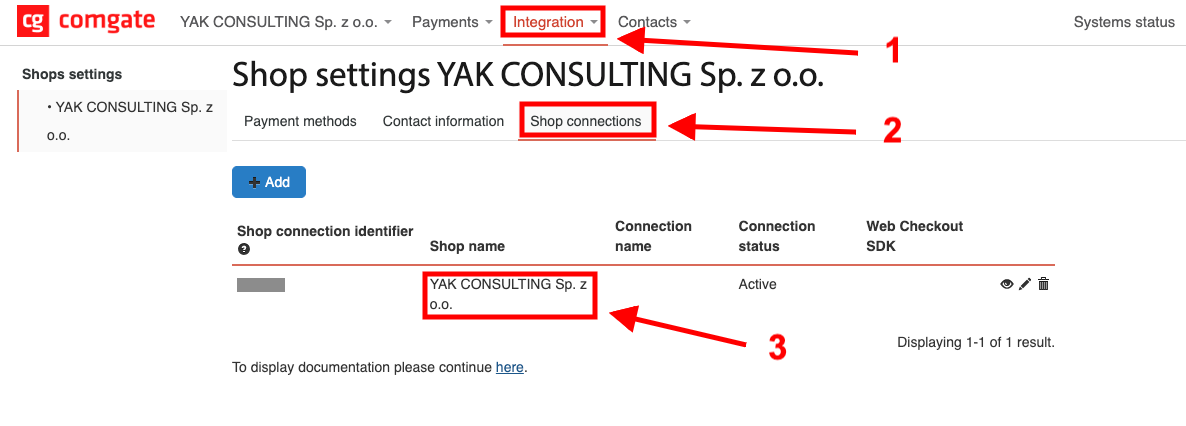
In the top menu, click Integration and select your company in Shop settings.
Go to the Shop connections tab.
Click the name of your shop or the pencil icon at the end of the row to edit the connection.
Shop connection configuration
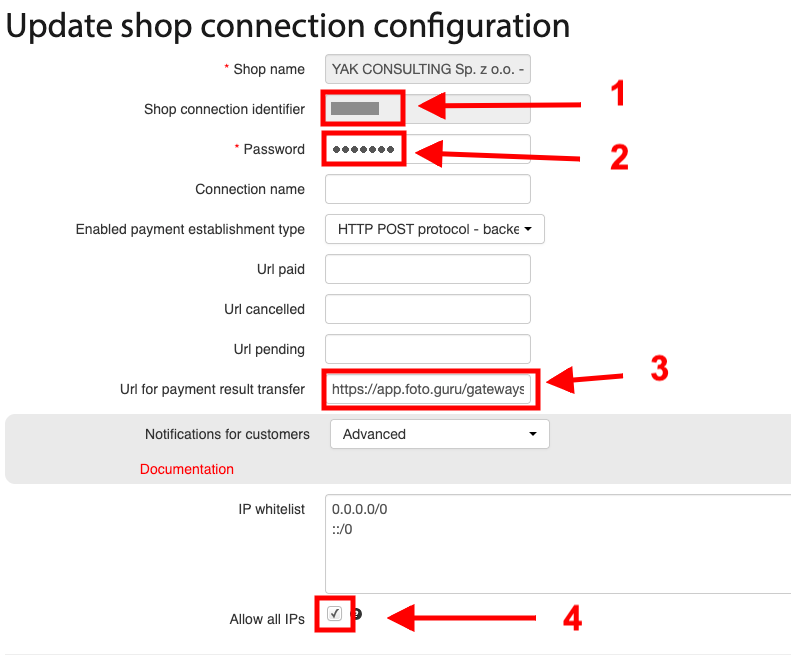
In the Update shop connection configuration form:
Copy the value of the
Shop connection identifierfield and paste it into theShop connection identifierfield in Foto.Guru.Copy the value of the
Passwordfield and paste it into theComgate passwordfield in Foto.Guru.In the
Url for payment result transferfield, paste the address that Foto.Guru displays in the payment settings after selecting theComgateoperator:https://app.foto.guru/gateways/comgate_gateway/callback
Tick the
Allow all IPsoption.
Finally, save the changes in the Comgate portal and in Foto.Guru.
Important
The settings from steps 3 and 4 are required. Without them, Foto.Guru will not receive the payment confirmation and the order status will not change automatically to “Paid”.
The Allow all IPs option is needed because Foto.Guru runs in the cloud and its IP addresses may change.
The connection is then protected by the password - do not share it with anyone.
You do not need to fill in the Url paid, Url cancelled and Url pending fields - Foto.Guru sends these
addresses with every payment.
Payment methods
Customers can pay only with the methods that Comgate has enabled for your shop. If the message
No valid method specified appears when trying to pay, contact Comgate and ask them to enable payment methods.