Frame sizes
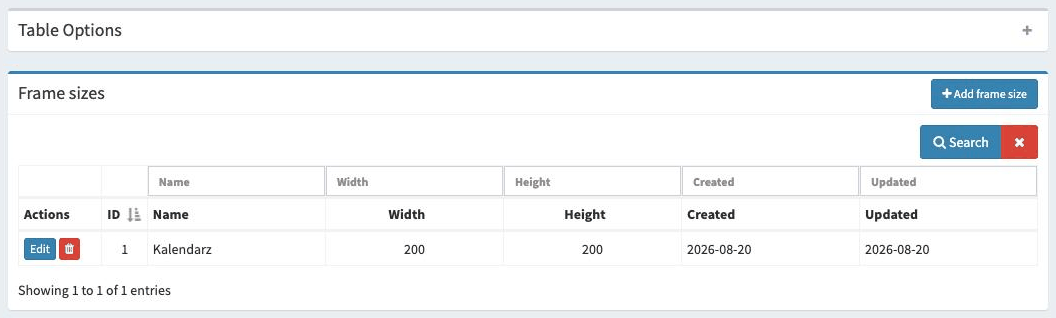
The Frame sizes tab (available separately for each category in the Photo products menu) is the place where we can define the frame sizes that will be available as components of products.
Available options
Here is a list of the available options with a short explanation.
- ID
The sequence number according to which the frame sizes will be displayed.
- Name
Frame size name.
- Width
Determines the minimum width of the frame in pixels (optional).
- Height
Determines the minimum height of the frame in pixels (optional).
Editing a frame size
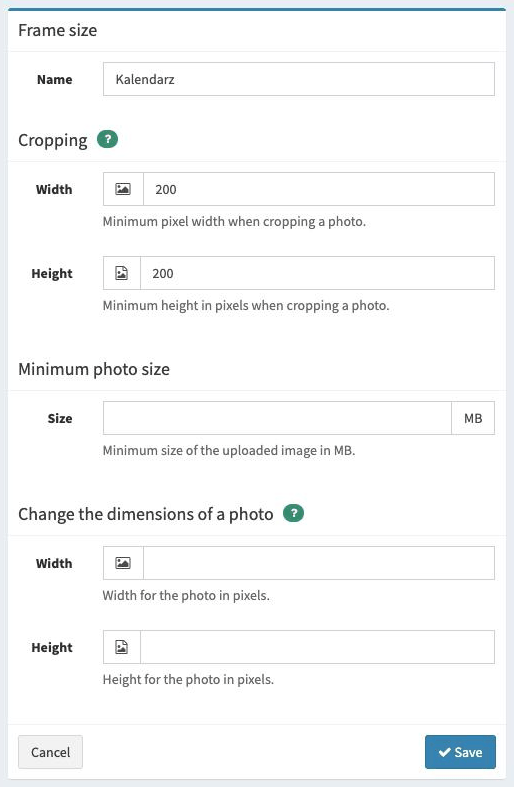
Cropping
The Cropping option determines the minimum width and height of the photo that can be set when the customer crops the photo while placing an order. Note that this option is only needed if we want to allow customers to crop photos.
The values set here should guarantee adequate photo quality after printing.
Tip
Pay attention to the dimensions you enter, because they are also responsible for the proportions of the photo. When changing the dimensions, remember to keep the proportions correct for the given frame.
Minimum photo size
The Minimum photo size option determines the minimum size of the photo in MB that a photo must have in order to be printed without problems. If the size is smaller, the customer will see a warning that the photo may be of too low quality.
Change the dimensions of a photo
This option allows photos to be automatically reduced to the given dimensions. This is very useful when customers upload large photos and the product does not require it. Thanks to this option, we can quickly scale the photos and obtain a smaller package of photos, which means the photos will be downloaded faster.
It should be noted that if the uploaded photos do not exactly match the defined proportions, they will be reduced proportionally - without “flattening”, i.e. the correct proportions will be preserved.
If the customer uploads photos with smaller dimensions than we have specified, such photos will not be processed in any way and will be sent in their original form.
Adding a frame size
Adding a new frame size works in the same way as editing an existing one.