Packeta
The Packeta tab allows integration with the Packeta pick-up point network (own pick-up points, Z-BOX parcel lockers and partner pick-up points).
Once the integration is enabled, the customer selects a Packeta pick-up point on a map while placing an order, and the selected point is verified when the order is placed. The map shows pick-up points in the country associated with your Packeta account. For cash on delivery, only points that accept cash on delivery are shown.
Note
The integration covers only the selection of the pick-up point by the customer. Labels and parcel dispatch remain in the Packeta panel.
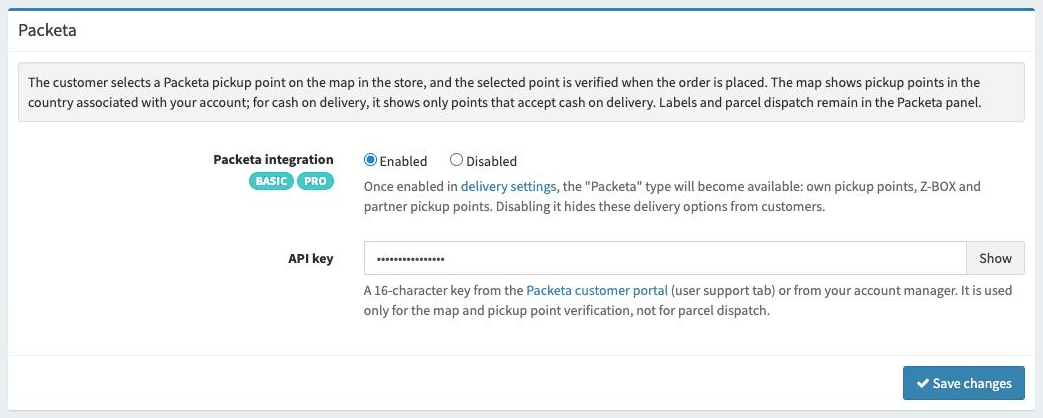
Available options
Here is a list of the available options with a short explanation.
- Packeta integration
Determines whether the Packeta integration is active. Once enabled, the
Packetatype becomes available in thePick-up pointoption of the delivery settings. Disabling it hides delivery options of this type from customers. To use the integration, you must have an active BASIC or PRO account.- API key
A 16-character key from the Packeta customer portal (user support tab) or from your account manager. The key is used only for displaying the map and verifying the selected pick-up point, not for parcel dispatch. Below we show where to find it.
Settings in the Packeta account
Log in to the Packeta customer portal at https://client.packeta.com.
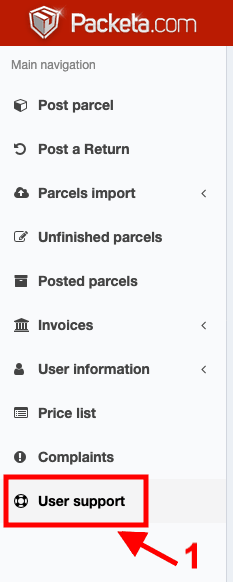
In the menu on the left, click User support.
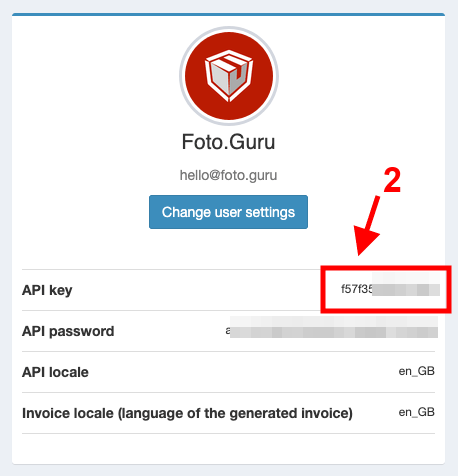
On the card with your account details, copy the value of the
API keyfield and paste it into theAPI keyfield in Foto.Guru.
Finally, save the changes in Foto.Guru.
Tip
If you cannot see the API key in the customer portal, ask your Packeta account manager for it.
Delivery with pick-up at a Packeta point
Once the integration is enabled, add or edit a delivery method in the delivery settings and select
Packeta in the Pick-up point option. From then on, customers who choose this delivery method will see a map of
Packeta pick-up points, and you will find the selected point in the order details.