SMS settings
The SMS settings tab is the place where we can change the settings for SMS messages that we send to customers. The page is divided into two tabs: SMS settings and Sent SMS messages.
Note
SMS messages are only sent to phone numbers from the country your account is assigned to (the country of your company, or, if it is not set, the country of your registration phone number). The dialling code and country name that apply to your account are shown at the top of the SMS settings tab. Numbers from other countries are skipped.
Note
SMS notifications are supported for the following countries: all member states of the European Union (Austria, Belgium, Bulgaria, Croatia, Cyprus, Czechia, Denmark, Estonia, Finland, France, Germany, Greece, Hungary, Ireland, Italy, Latvia, Lithuania, Luxembourg, Malta, Netherlands, Poland, Portugal, Romania, Slovakia, Slovenia, Spain, Sweden), as well as the United Kingdom and the United States. If your account is assigned to a country outside this list, notifications can only be sent to Polish phone numbers (dialling code +48).
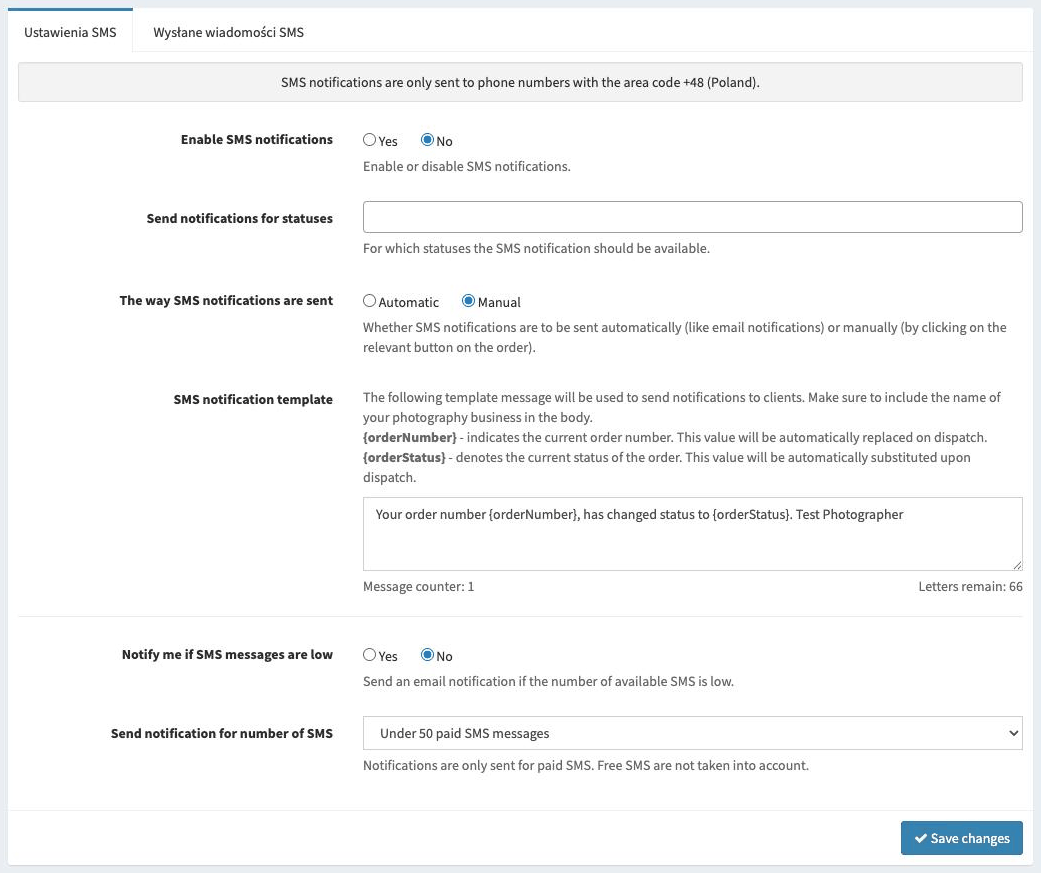
Available options
Here is a list of the available options with a short explanation.
- Enable SMS notifications
Enables or disables SMS notifications.
- Send notifications for statuses
For which order statuses notifications should be available.
- The way SMS notifications are sent
Whether SMS notifications are to be sent automatically (like email notifications) or manually (by clicking the relevant button next to the order).
If we choose the manual method, an additional button will appear on the order list, which will send the notification.
Tip
Regardless of status notifications, for every order with a phone number on the order list there is an SMS message button, which lets you send any custom message to the customer.
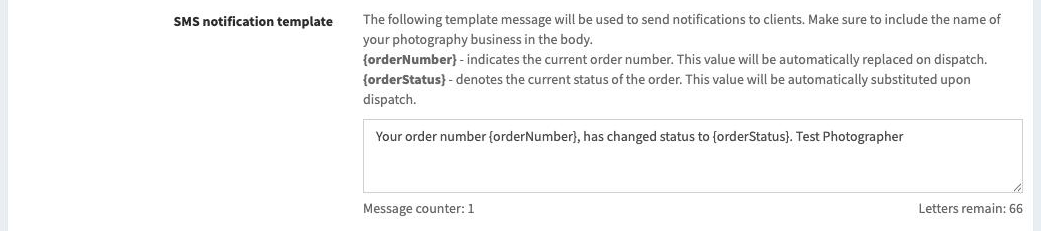
- SMS notification template
The SMS message template that will be used to generate notifications about order status changes.
It is important to use the
{orderStatus}variable in the message. This variable will be automatically replaced with the name of the current status.Another variable is
{orderNumber}. This variable will be automatically replaced with the customer’s order number.Depending on the length of the SMS, a different number of messages will be used to send the notification. As standard, one message holds up to 160 characters, or 70 characters if at least one special character occurs (diacritical marks are considered special).
Even if more than one SMS message is needed to send the notification, the customer will receive it as a single message.
Tip
If you want to use as few messages per notification as possible, you can avoid using diacritical marks. Then the limit of one message will be increased from 70 to 160 characters.
- Notify me if SMS messages are low
Enables an email notification that will be sent once after the number of SMS messages from the next option has been exceeded.
- Send notification for number of SMS
Determines the threshold of available SMS messages below which the email notification will be sent.
Available SMS messages
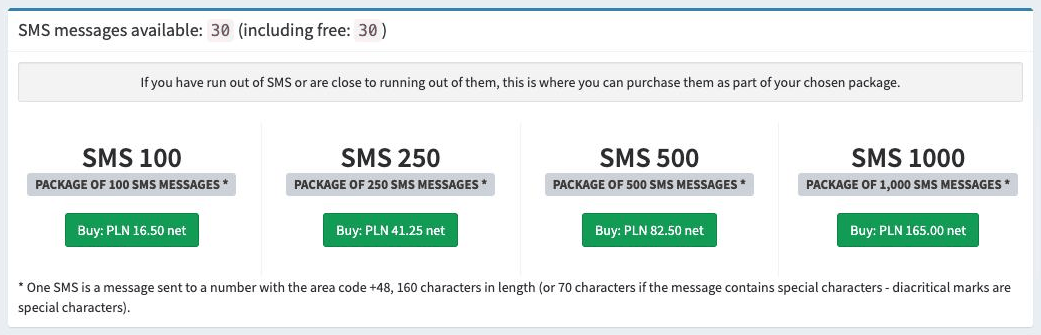
The current number of SMS messages that can be sent is displayed here.
Note
On the 1st day of each month, free SMS messages are granted for use in that month.
The number of free SMS messages granted each month differs depending on the licence you have:
BASIC version: 10 SMS messages
PRO version: 30 SMS messages
Unused free SMS messages are forfeited.
Buying SMS message packages
It is possible to buy additional SMS message packages. Purchased messages do not expire and can be used at any time.
The available message packages are: 100, 250, 500 and 1000. The unit price of an SMS message is always the same for each package and amounts to PLN 0.165 net.
Sent SMS messages
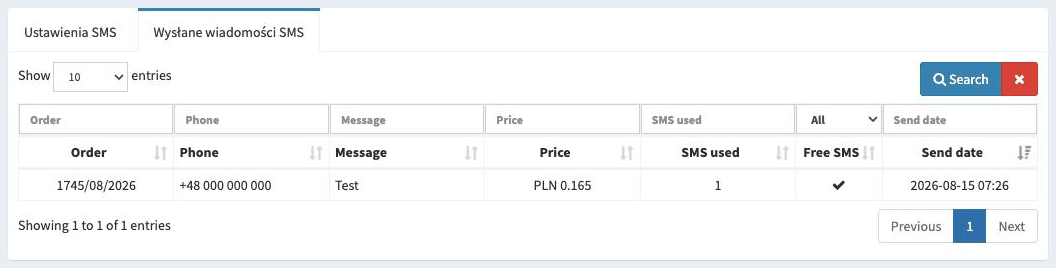
In the Sent SMS messages tab we can browse all the SMS messages that have been sent.
- Order
The order number the message is associated with.
- Phone
The phone number to which the message was sent.
- Message
The content of the message that was sent.
- Price
The price of the message that was sent.
- SMS used
How many SMS messages were used to send the notification.
- Free SMS
Whether the message was sent from the pool of free SMS messages.
- Send date
The date the SMS message was sent.