Paynow
Here is an explanation of the payment settings for the Paynow operator.

Available options
Here is a list of the available options with a short explanation.
Settings in the Paynow account
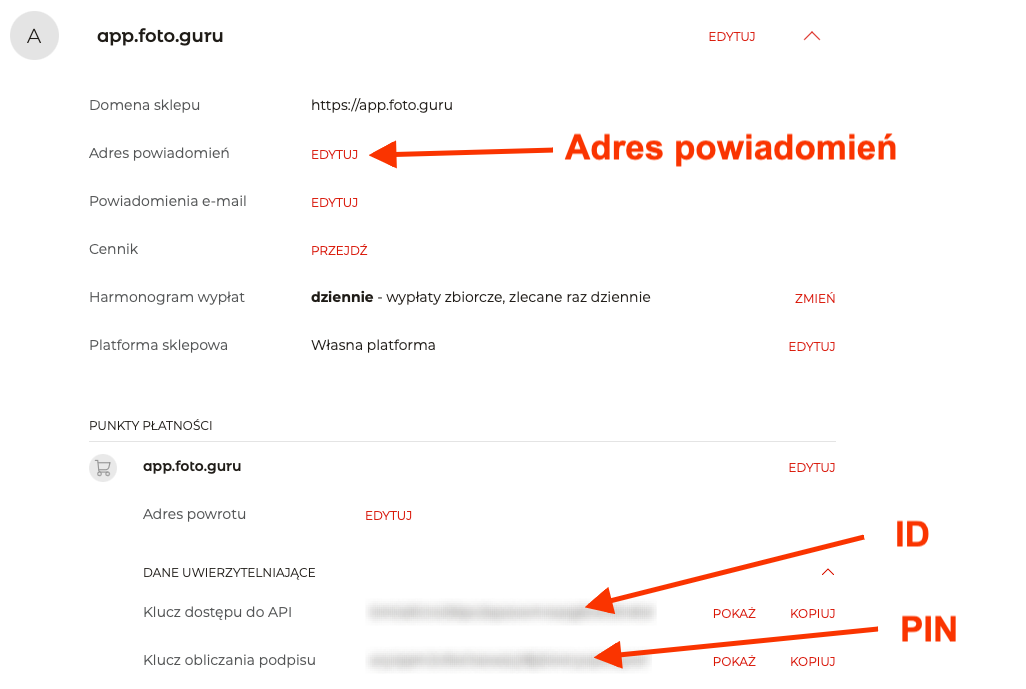
Go to the Settings menu and then to Shops and payment points.
Below we show where to find the data we are interested in: ID and PIN. This will help you quickly find your way around your Paynow account.
When configuring the payment point, you also need to configure the Notification address. The value to be set is available in the Foto.Guru panel. Thanks to this, the order status will automatically change to “Paid” when the customer pays for it correctly.